
一,异常概述
异常介绍:
- 异常:代表程序出现的问题
- 误区:不是让我们以后不出异常,而是程序出了异常之后,该怎么处理。
异常的继承体系:
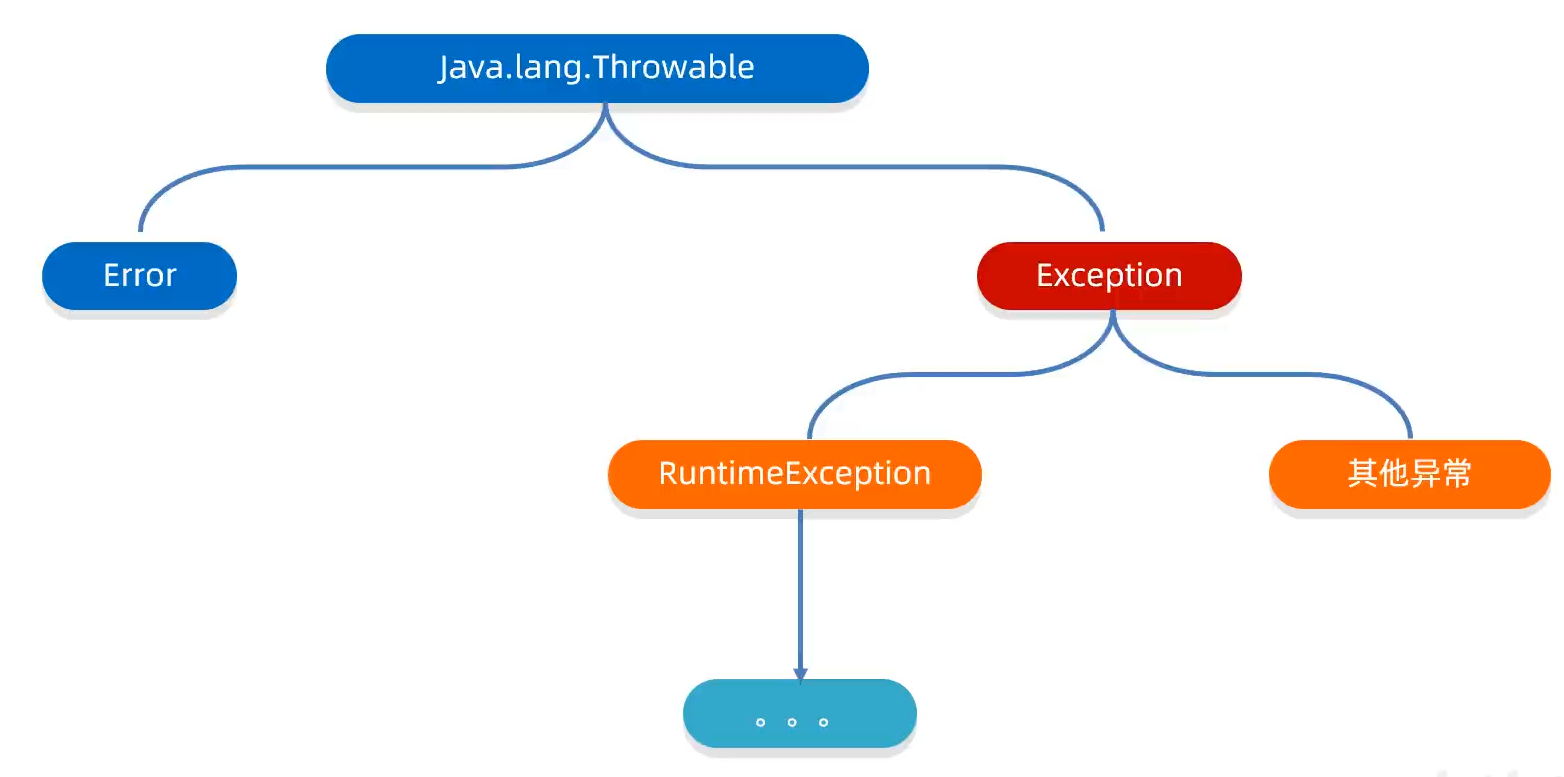
异常的分类
- Error(错误,通常不可恢复)
- VirtualMachineError:虚拟机错误
- OutOfMemoryError:内存溢出
- StackOverflowError:栈溢出
- Exception(异常,可处理)
- RuntimeException(运行时异常,非受检异常)
- 编译时检查,必须处理
- 继承自Exception(但不包括RuntimeException)
- 示例:IOException、SQLException
- 其他Exception(受检异常)
- 编译时不强制检查
- 包括RuntimeException及其子类,以及Error及其子类
- 示例:NullPointerException、ArrayIndexOutOfBoundsException
- RuntimeException(运行时异常,非受检异常)
异常的作:
- 异常是用来查询bug的关键参考信息。
- 异常可以作为方法内部的一种特殊返回值,以便通知调用者底层的执行情况。
二,异常的处理方式
2.1 JVM默认的处理方式
- 把异常的名称,异常原因以及异常出现的位置等信息输出在控制台。
- 程序停止执行,异常下面的代码不会再执行。
2.2 自己处理(捕获异常)
捕获异常的目的:不让程序停止。
格式:
try{
    可能出现异常的代码;
} catch(异常类名 变量名){
    异常的处理代码;
}finally{
    //不管程序是否跳转到 catch 块中,finally 块中的代码都会被执行。
    //finally可以不写,但是一般情况下都建议编写,用来释放资源或者关闭流等操作
    System.out.println("finally 块中的代码已经执行完毕");
}
目的:当代码出现异常时,可以让程序继续往下执行。
举例:
try{
    //可能出现异常的代码
	System.out.println(2/0);//这里出现了异常,程序就会在这里创建一个ArithmeticException对象
    					//new ArithmeticException();
    					//拿着这个对象到catch的小括号中进行对比,看小括号中的变量能否接收这个对象
    					//如果能接收,就表示这个异常被捕获(抓住),执行catch里面对应的代码
    					//当catch里面所有的代码执行完毕,继续执行try...catch体系下面其他代码
}catch(ArithmeticException e){
    //如果出现了ArithmeticException异常,我该如何处理
	System.out.println("算数异常");
}finally{
    System.out.println("finally 块中的代码已经执行完毕");
}
使用情况:
-
如果 try 中没有遇到问题,那么就不会执行 catch 中的代码,而是执行 try 中代码。
-
如果 try 中遇到多个问题,会写多个 catch 与之对应
如果要捕获多个异常,这些异常中如果存在继承关系,那么 ** 父类一定要写在最下面。** 这个注意下,很容易忽略!!
在 jdk7 以后可以在 catch 中的同时捕获多个异常,中间用
|隔开catch(ArrayIndexOutOfBoundsException | ArithmeticException e )表示如果出现了 A 异常或 B 异常,采用同一种处理方案。public class Text { public static void main(String[] args){ int[] arr={1,2,3,4,5,6}; try{ System.out.println(arr[10]);//如果没有写多个catch System.out.println(2/0); String s=null; System.out.println(s.equals("abc")); }catch (ArrayIndexOutOfBoundsException e){ System.out.println("索引越界"); }catch (ArithmeticException e){ System.out.println("算数异常"); }catch (NullPointerException e){ System.out.println("空指针异常"); }finally{ System.out.println("finally 块中的代码已经执行完毕"); } System.out.println("看看我执行了么"); } }上面这么多 catch,只能输出第一个捕获到异常的 catch 中的代码。
建议按照 try 中代码顺序依次写 catch 捕获对应的异常,增强可读性。
-
如果 try 中遇到的问题没有被捕获,即 catch 中写的依次与实际引发的异常不一样,这样就会无法捕获到异常。
此时相当于 try catch 代码白写了,最终采用 JVM 进行默认处理。
-
如果 try 中遇到了异常,那么try 下面的其他代码就不会执行了
public class Text {
    public static void main(String[] args){
        int[] arr={1,2,3,4,5,6};
        try{
            System.out.println(arr[10]);
            System.out.println("这里不执行了");//这段代码就不会执行
        }catch (ArrayIndexOutOfBoundsException e) {
            System.out.println("索引越界");
        }finally{
            System.out.println("finally 块中的代码已经执行完毕");
        }
        System.out.println("看看我执行了么");
    }
}
异常中常用方法(Throwable 的成员方法):
| 方法名 | 说明 |
|---|---|
| public String getMessage() | 返回异常的简短描述 |
| public String toString() | 返回异常的详细描述 |
| public void printStackTrace() | 把异常的错误信息输出在控制台 |
第三个方法虽然会把异常的所有信息打印在控制台和 JVM 默认处理方法一样,但是!!不会停止运行下面的代码
第三个方法包含了上面两个方法的信息,是最常用的。
第三个方法在底层利用 System.err.println 进行输出,在控制太显示红色字体
2.3 try-catch-finally的执行顺序
//基本执行顺序
try {
    // 1. 先执行try块代码
    // 如果发生异常,跳转到catch
    // 如果有return,会先计算返回值,暂存
} catch {
    // 2. 如果有匹配的异常,执行catch块
    // 如果有return,会先计算返回值,暂存
} finally {
    // 3. 无论是否发生异常,都会执行finally
    // finally中的return会覆盖之前的返回值
}
// 4. 如果没有return,继续执行后续代码
总结
| 场景 | try | catch | finally | 返回值/异常 |
|---|---|---|---|---|
| 无异常,无return | ✓ | ✗ | ✓ | 继续执行 |
| 无异常,try有return | ✓ | ✗ | ✓ | try的return值 |
| 无异常,try和finally都有return | ✓ | ✗ | ✓ | finally的return值 |
| 有异常,catch处理 | ✓ | ✓ | ✓ | catch的return值 |
| 有异常,catch和finally都有return | ✓ | ✓ | ✓ | finally的return值 |
| finally中有异常 | ✓ | 可选 | ✓ | finally的异常 |
| try和catch都有异常 | ✓ | ✓ | ✓ | catch的异常 |
重要规则
- finally总是执行:无论try/catch中是否有return或异常
- 返回值计算时机:return语句执行时计算返回值并暂存
- finally覆盖规则:
- finally中有return:覆盖try/catch的return
- finally中有异常:覆盖try/catch的return和异常
- finally中修改基本类型:不影响已暂存的返回值
- finally中修改引用类型:可能影响返回的对象状态
- 异常链:如果try和catch都抛出异常,后抛出的异常会覆盖先前的
2.4 交给调用者处理(抛出异常)
抛出异常的目的:告诉方法调用者这个方法出错了!
方法抛出异常要写两个部分:
-
throws写在方法定义处,表示声明一个异常。告诉调用者,使用本方法可能有哪些异常。
如果是编译时异常:必须要写
如果是运行时异常:可以省略不写
public void 方法() throws 异常类名1,异常类名2,....{ } -
throw写在方法内,结束方法。手动抛出异常对象,交给调用者。方法中下面的代码不再执行了。
public void 方法(){ throw new NullPointerException(); System.out.println("这部分代码不会执行"); } -
完整写法
public void 方法() throws 异常类名1,异常类名2,...{//如果是runtime异常可以不写
    throw new NullPointerException();
    System.out.println("这部分代码不会执行");
}
举例:
//写一个获取数组最大元素的方法
public int getMax(int[] arr){
    if(arr==null){
        //此时抛出异常
        throw new NullPointerException;
    }
    if(arr.length==0){
        throw new ArrayIndexOutOfBoundsException();
    }
    int max=arr[0];
    for(int i=1;i<arr.length;i++){
        if(arr[i]>max){
            max=arr[i]
        }
    }
    return max;
}
// 测试类
public class Text {
    public static void main(String[] args){
        int[] arr=null;
        int max=0
        try{
            max=getMax(arr);//将调用方法的代码用try进行捕捉,要不然下面的代码将无法执行。
        }catch(NullPointerException e){//空指针异常
            e.printStackTrace();
        }catch(ArrayIndexOutOfBoundsException e){//索引越界异常
            e.printStackTrace();
        }
    }
}
三,自定义异常
步骤:
-
定义异常类
-
写继承关系
如果是运行时异常:继承
RuntimeException如果是编译时异常:继承
Exception,如果方法中 new 出编译时异常,我们需要在方法外部 throws 抛出。 -
空参构造
-
带参构造
自定义异常的意义:让控制台的报错信息更加见名知意。
可以在 Catch 中捕捉哪些 java 中没有定义的比如说名字规范等情况。
自定义异常的规范写法:
public class NameFormatException{}
//NameFormat:异常名字
//Exception:表示这是一个异常类
//使用大驼峰命名法
举例:
//自定义运行时异常
public class NameFormatException extends RuntimeException{//姓名格式异常(自定义的)(idea快捷键alt+insert自动补齐即可)
    public NameFormatException() {
    }
    public NameFormatException(String message) {//传入异常的信息
        super(message);
    }
}
//自定义编译时异常
public class NameFormatException extends Exception{
    public NameFormatException(String message) {
        super(message);
    }
    public NameFormatException() {

    }
}

import Exception.NameFormatException;
public class ExceptionExample {
    public static void main(String[] args) {
        try{
            saveName("");
        }catch(NameFormatException e){
            e.printStackTrace();
            System.out.println("Error saving name");
        }
    }

    public static void saveName(String name) throws NameFormatException{
        if(name.isEmpty()){
            throw new NameFormatException("名字不能为空");
        }else{
            System.out.println("Name saved");
        }
    }

}
