

一、注解是什么?
注解就是给代码贴的「便利贴」,告诉编译器、工具或框架一些额外信息。
// 没有注解:纯代码
public class User {
    private String name;

    public String getName() {
        return name;
    }
}

// 有注解:代码+标签
@RestController          // 贴标签:这是一个控制器
@RequestMapping("/api")  // 贴标签:映射到/api路径
public class UserController {

    @Autowired          // 贴标签:自动注入
    private UserService userService;

    @GetMapping("/user")  // 贴标签:GET请求处理器
    @ResponseBody        // 贴标签:返回JSON
    public User getUser(@RequestParam int id) {  // 贴标签:从请求参数获取
        return userService.findById(id);
    }
}
二、注解的四大作用
2.1 给编译器看(编译时处理)
// @Override:检查是否正确重写
public class Parent {
    public void sayHello() {
        System.out.println("Hello from Parent");
    }
}

public class Child extends Parent {
    @Override  // 编译器:检查这个方法是否真的重写了父类方法
    public void sayHello() {  // 如果写成sayHelloo(),编译器会报错!
        System.out.println("Hello from Child");
    }

    // @Deprecated:标记过时方法
    @Deprecated
    public void oldMethod() {
        // 不推荐使用了
    }

    // @SuppressWarnings:抑制警告
    @SuppressWarnings("unchecked")
    public List<String> getList() {
        return new ArrayList();  // 没有泛型,本来会有警告
    }
}
2.2 给工具看(生成文档等)
// @Deprecated:IDE会划横线提示
@Deprecated(since = "2.0", forRemoval = true)
public class OldClass {
    // 文档工具会特别标注
}

// 自己写的工具可以通过注解生成文档
2.3 给框架看(运行时处理)
// Spring Boot应用
@SpringBootApplication  // 框架:这是一个Spring Boot应用
public class Application {
    public static void main(String[] args) {
        SpringApplication.run(Application.class, args);  // 框架读取注解配置
    }
}

@Service  // 框架:这是一个Service,要纳入IoC容器
public class UserService {
    @Transactional  // 框架:这个方法需要事务管理
    public void saveUser(User user) {
        // 保存用户
    }
}
2.4 给APT看(编译时生成代码)
// Lombok注解:编译时生成代码
@Data  // 编译时生成getter、setter、equals、hashCode等
@AllArgsConstructor  // 生成全参构造
@NoArgsConstructor   // 生成无参构造
public class User {
    private String name;
    private int age;
}

// 编译后实际生成的代码:
public class User {
    private String name;
    private int age;

    // 自动生成的方法
    public String getName() { return name; }
    public void setName(String name) { this.name = name; }
    // ... 其他方法
}
三,元注解
元注解:修饰注解的注解
常见的元注解:
3.1 @Target - 指定注解能用在哪里
@Target - 指定注解能用在哪里
import java.lang.annotation.*;

// 只能用在方法上
@Target(ElementType.METHOD)
public @interface MethodAnnotation {
    String value() default "";
}

// 可以用在方法和字段上
@Target({ElementType.METHOD, ElementType.FIELD})
public @interface MethodOrFieldAnnotation {}

// 所有可用的位置:
@Target(ElementType.TYPE)           // 类、接口、枚举
@Target(ElementType.FIELD)          // 字段
@Target(ElementType.METHOD)         // 方法
@Target(ElementType.PARAMETER)      // 参数
@Target(ElementType.CONSTRUCTOR)    // 构造方法
@Target(ElementType.LOCAL_VARIABLE) // 局部变量
@Target(ElementType.ANNOTATION_TYPE) // 其他注解上
@Target(ElementType.PACKAGE)        // 包上
@Target(ElementType.TYPE_PARAMETER) // 类型参数(Java 8+)
@Target(ElementType.TYPE_USE)       // 类型使用(Java 8+)
3.2 @Retention
@Retention - 注解保留到什么时候
// 只在源码中,编译后丢弃
@Retention(RetentionPolicy.SOURCE)
public @interface SourceAnnotation {
    // 如@Override,编译后就不需要了
}

// 保留到类文件,但运行时不可见
@Retention(RetentionPolicy.CLASS)
public @interface ClassAnnotation {
    // 很少用
}

// 保留到运行时,可以通过反射获取
@Retention(RetentionPolicy.RUNTIME)
public @interface RuntimeAnnotation {
    // 如Spring的@Service,运行时需要
}
3.3 @Documented
@Documented - 是否包含在 JavaDoc 中
// 包含在JavaDoc中
@Documented
public @interface DocumentedAnnotation {
    String value();
}

// 不包含在JavaDoc中(默认)
public @interface UndocumentedAnnotation {
    String value();
}
3.4 @Inherited
@Inherited - 子类是否继承
// 有@Inherited:子类会继承
@Inherited
@Target(ElementType.TYPE)
@Retention(RetentionPolicy.RUNTIME)
public @interface InheritedAnnotation {
    String value() default "";
}

// 没有@Inherited:子类不会继承
@Target(ElementType.TYPE)
@Retention(RetentionPolicy.RUNTIME)
public @interface NonInheritedAnnotation {
    String value() default "";
}

// 使用示例
@InheritedAnnotation("父类")
class Parent {}

class Child extends Parent {}  // Child也有@InheritedAnnotation

@NonInheritedAnnotation("父类")
class Parent2 {}

class Child2 extends Parent2 {}  // Child2没有@NonInheritedAnnotation
3.5 @Repeatable
@Repeatable(Java 8+)- 可重复注解
// 旧方式:用容器注解
public @interface Roles {
    Role[] value();
}

public @interface Role {
    String value();
}

@Roles({
    @Role("admin"),
    @Role("user")
})
public class OldUser {}

// 新方式:@Repeatable
@Repeatable(Roles.class)
public @interface Role {
    String value();
}

// 可以直接重复使用
@Role("admin")
@Role("user")
@Role("manager")
public class NewUser {}
四,自定义注解
// 定义注解
public @interface MyAnnotation {
    // 属性(类似方法,但有返回值)
    String value();  // 必须的属性

    int count() default 1;  // 可选属性,有默认值

    String[] tags() default {};  // 数组属性

    Class<?> clazz() default Object.class;  // Class类型属性

    RetentionPolicy policy() default RetentionPolicy.RUNTIME;  // 枚举类型

    OtherAnnotation nested() default @OtherAnnotation;  // 嵌套注解
}

// 使用注解
@MyAnnotation(
    value = "测试",
    count = 5,
    tags = {"java", "annotation"},
    clazz = String.class,
    policy = RetentionPolicy.RUNTIME,
    nested = @OtherAnnotation("嵌套")
)
public class MyClass {}
特殊属性:value:
- 如果注解中只有一个value属性,使用注解时,value名称可以不写
- 如果注解中有多个属性,除了value属性其他属性都有默认值,使用注解时,value名称可以不写
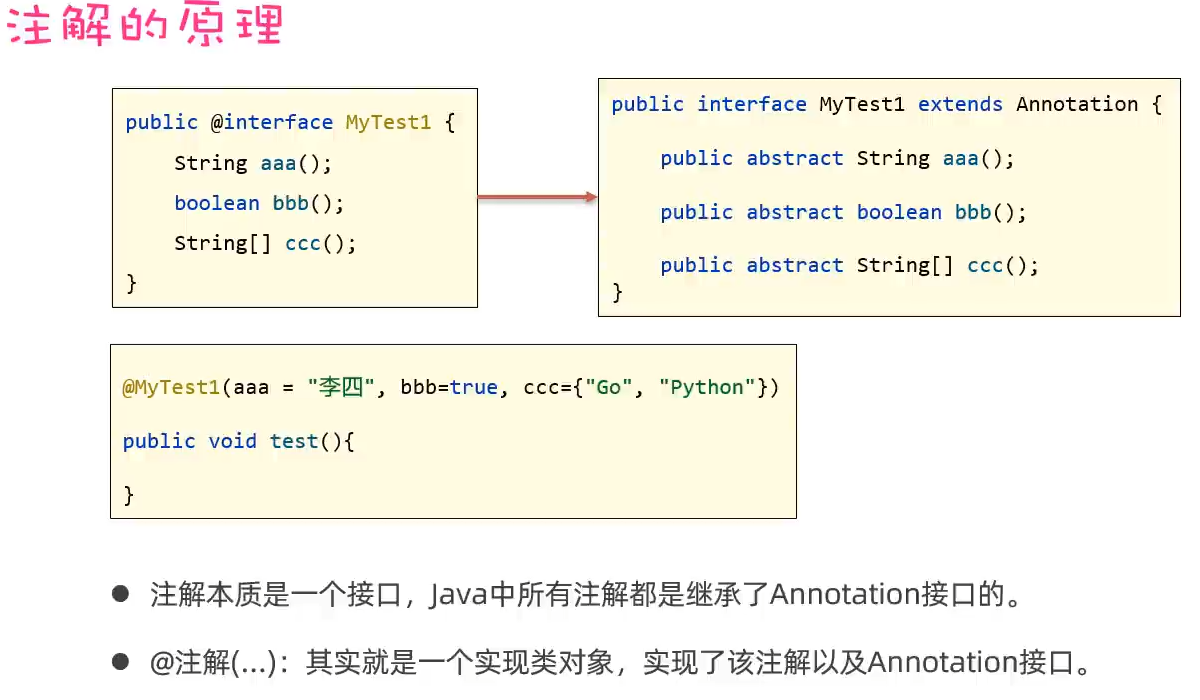
注解的原理
四,解析注解
注解的解析:就是判断类上、方法上、成员变量上是否存在注解,并把注解里的内容给解析出来
指导思想:
- 要解析谁上面的注解,就应该先拿到谁
- 要解析类上面的注解,则应该先获取该类的Class对象,再通过Class对象解析其上面的注解
- 解析成员方法上的注解,则应该获取到该成员方法的Method对象,再通过Method对象解析其上面的注解
- Class、Method、Field,Constructor、都实现了AnnotatedElement接口,它们都拥有解析注解的能力。

4.1 示例1:字段验证注解
import java.lang.annotation.*;
import java.lang.reflect.Field;

// 定义验证注解
@Target(ElementType.FIELD)
@Retention(RetentionPolicy.RUNTIME)
public @interface Validation {
    // 必填
    boolean required() default false;

    // 最小长度(字符串)
    int minLength() default 0;

    // 最大长度(字符串)
    int maxLength() default Integer.MAX_VALUE;

    // 最小值(数字)
    double minValue() default Double.MIN_VALUE;

    // 最大值(数字)
    double maxValue() default Double.MAX_VALUE;

    // 正则表达式
    String regex() default "";

    // 自定义错误消息
    String message() default "验证失败";
}

// 用户类
public class User {
    @Validation(required = true, minLength = 2, maxLength = 20,
                message = "姓名长度必须在2-20之间")
    private String name;

    @Validation(required = true, minValue = 0, maxValue = 150,
                message = "年龄必须在0-150之间")
    private int age;

    @Validation(regex = "^1[3-9]\\d{9}$",
                message = "手机号格式不正确")
    private String phone;
}

// 验证器
public class Validator {
    public static void validate(Object obj) throws Exception {
        //1.先获取对象的字节码文件
        Class<?> clazz = obj.getClass();
        //2.获取对接里面的方法
        Field[] fields = clazz.getDeclaredFields();
        //遍历方法
        for (Field field : fields) {
            if (field.isAnnotationPresent(Validation.class)) {
                field.setAccessible(true);
                Validation validation = field.getAnnotation(Validation.class);
                Object value = field.get(obj);

                // 必填检查
                if (validation.required() && value == null) {
                    throw new IllegalArgumentException(field.getName() + ": " +
                                                     validation.message());
                }

                if (value != null) {
                    // 字符串长度检查
                    if (value instanceof String) {
                        String str = (String) value;
                        if (str.length() < validation.minLength() ||
                            str.length() > validation.maxLength()) {
                            throw new IllegalArgumentException(field.getName() + ": " +
                                                             validation.message());
                        }

                        // 正则检查
                        if (!validation.regex().isEmpty() &&
                            !str.matches(validation.regex())) {
                            throw new IllegalArgumentException(field.getName() + ": " +
                                                             validation.message());
                        }
                    }

                    // 数字范围检查
                    if (value instanceof Number) {
                        double num = ((Number) value).doubleValue();
                        if (num < validation.minValue() ||
                            num > validation.maxValue()) {
                            throw new IllegalArgumentException(field.getName() + ": " +
                                                             validation.message());
                        }
                    }
                }
            }
        }
    }
}

// 使用验证器
public class Main {
    public static void main(String[] args) {
        User user = new User();
        user.setName("张");  // 长度不够
        user.setAge(200);    // 年龄太大
        user.setPhone("123"); // 手机号格式错误

        try {
            Validator.validate(user);
        } catch (Exception e) {
            System.out.println(e.getMessage());
            // 输出:姓名长度必须在2-20之间
        }
    }
}
4.2 示例2:注解处理器(APT)
-
编译时处理
// 自定义注解处理器 @SupportedAnnotationTypes("com.example.MyAnnotation") @SupportedSourceVersion(SourceVersion.RELEASE_8) public class MyAnnotationProcessor extends AbstractProcessor { @Override public boolean process(Set<? extends TypeElement> annotations, RoundEnvironment roundEnv) { // 处理所有被@MyAnnotation标记的元素 for (Element element : roundEnv.getElementsAnnotatedWith(MyAnnotation.class)) { // 生成代码、检查代码、输出警告等 processingEnv.getMessager().printMessage( Diagnostic.Kind.NOTE, "找到注解: " + element.getSimpleName() ); } return true; } } -
Lombok 原理(简化版)
// Lombok的@Data注解处理器会:
// 1. 找到有@Data的类
// 2. 分析字段
// 3. 生成getter、setter等方法
// 4. 修改AST(抽象语法树)
