




SpringAMQP
将来我们开发业务功能的时候,肯定不会在控制台收发消息,而是应该基于编程的方式。由于RabbitMQ采用了 AMQP 协议,因此它具备跨语言的特性。任何语言只要遵循 AMQP 协议收发消息,都可以与RabbitMQ交互。并且RabbitMQ官方也提供了各种不同语言的客户端。
但是,RabbitMQ 官方提供的 Java 客户端编码相对复杂,一般生产环境下我们更多会结合 Spring 来使用。而 Spring 的官方刚好基于 RabbitMQ 提供了这样一套消息收发的模板工具:SpringAMQP。并且还基于 SpringBoot 对其实现了自动装配,使用起来非常方便。
SpringAmqp 的官方地址:https://spring.io/projects/spring-amqp
SpringAMQP 提供了三个功能:
- 自动声明队列、交换机及其绑定关系
- 基于注解的监听器模式,异步接收消息
- 封装了RabbitTemplate工具,用于发送消息
快速入门
在之前的案例中,我们都是经过交换机发送消息到队列,不过有时候为了测试方便,我们也可以直接向队列发送消息,跳过交换机。
在入门案例中,我们就演示这样的简单模型,如图

也就是:
- publisher直接发送消息到队列
- 消费者监听并处理队列中的消息
注意:这种模式一般测试使用,很少在生产中使用。
-
引入 AMQP 依赖
<!--AMQP依赖,包含RabbitMQ--> <dependency> <groupId>org.springframework.boot</groupId> <artifactId>spring-boot-starter-amqp</artifactId> </dependency> -
在控制台新建一个队列:
simple.queue -
消息发送
首先配置 MQ 地址,在
publisher服务的application.yml中添加配置:spring: rabbitmq: host: 192.168.150.101 # 你的虚拟机IP port: 5672 # 端口 virtual-host: /hmall # 虚拟主机 username: hmall # 用户名 password: 123 # 密码然后在
publisher服务中编写测试类SpringAmqpTest,并利用RabbitTemplate实现消息发送:package com.itheima.publisher.amqp; import org.junit.jupiter.api.Test; import org.springframework.amqp.rabbit.core.RabbitTemplate; import org.springframework.beans.factory.annotation.Autowired; import org.springframework.boot.test.context.SpringBootTest; @SpringBootTest public class SpringAmqpTest { @Autowired private RabbitTemplate rabbitTemplate; @Test public void testSimpleQueue() { // 队列名称 String queueName = "simple.queue"; // 消息 String message = "hello, spring amqp!"; // 发送消息 rabbitTemplate.convertAndSend(queueName, message); } } -
消息接受
首先配置 MQ 地址,在
consumer服务的application.yml中添加配置:spring: rabbitmq: host: 192.168.150.101 # 你的虚拟机IP port: 5672 # 端口 virtual-host: /hmall # 虚拟主机 username: hmall # 用户名 password: 123 # 密码然后在
consumer服务的com.itheima.consumer.listener包中新建一个类SpringRabbitListener,代码如下:package com.itheima.consumer.listener; import org.springframework.amqp.rabbit.annotation.RabbitListener; import org.springframework.stereotype.Component; @Component public class SpringRabbitListener { // 利用RabbitListener来声明要监听的队列信息 // 将来一旦监听的队列中有了消息,就会推送给当前服务,调用当前方法,处理消息。 // 可以看到方法体中接收的就是消息体的内容 @RabbitListener(queues = "simple.queue") public void listenSimpleQueueMessage(String msg) throws InterruptedException { System.out.println("spring 消费者接收到消息:【" + msg + "】"); } } -
测试
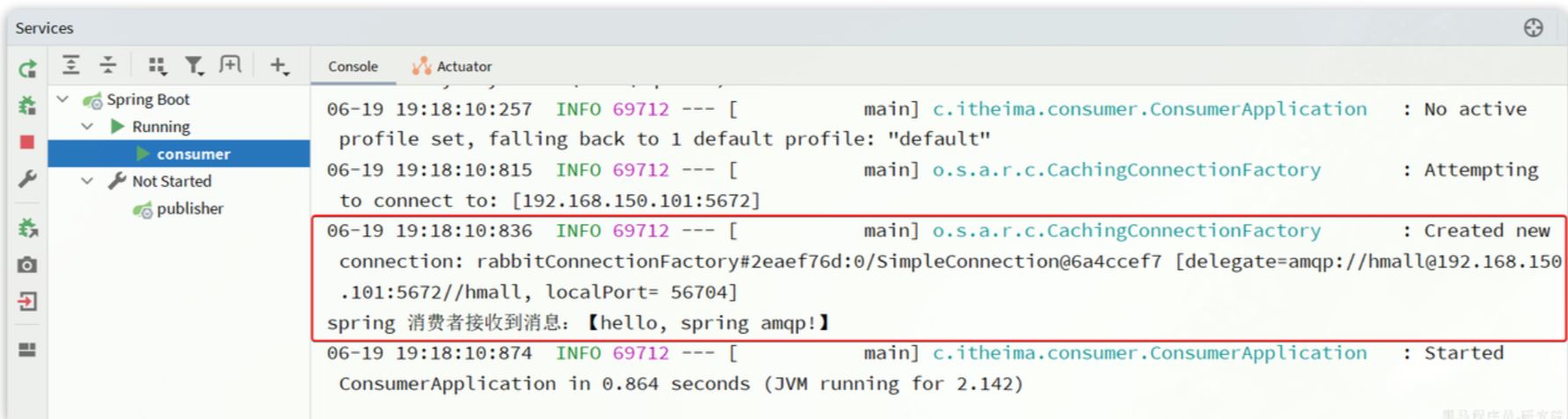
启动 consumer 服务,然后在 publisher 服务中运行测试代码,发送 MQ 消息。最终 consumer 收到消息:
WorkQueue模型
Work queues,任务模型。简单来说就是让多个消费者绑定到一个队列,共同消费队列中的消息。
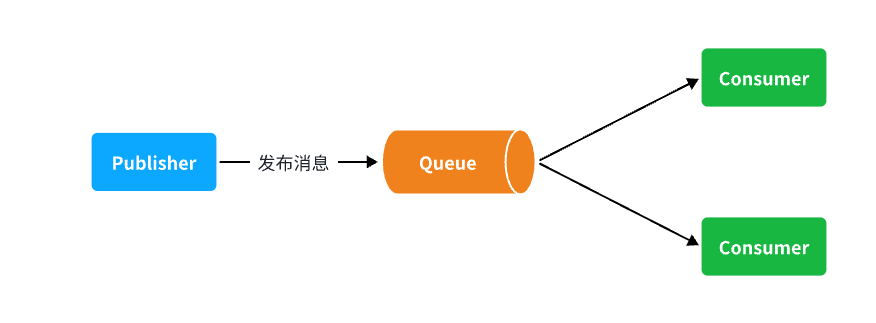
当消息处理比较耗时的时候,可能生产消息的速度会远远大于消息的消费速度。长此以往,消息就会堆积越来越多,无法及时处理。
此时就可以使用 work 模型,多个消费者共同处理消息处理,消息处理的速度就能大大提高了。
接下来,我们就来模拟这样的场景。
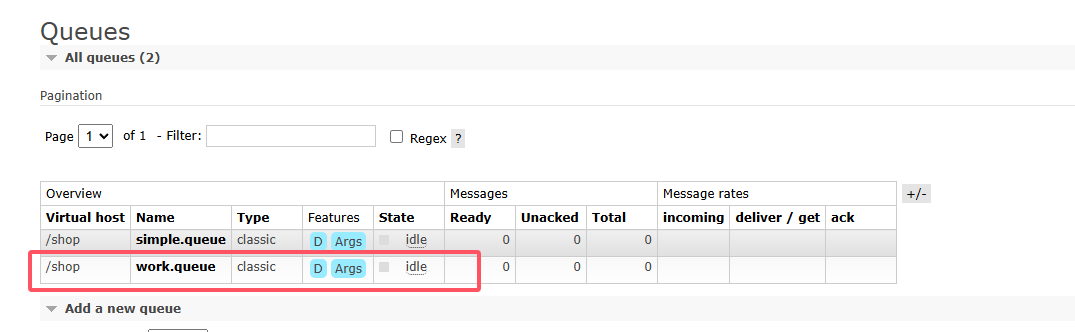
首先,我们在控制台创建一个新的队列,命名为work.queue:
-
消息发送
这次我们循环发送,模拟大量消息堆积现象。
在 publisher 服务中的 SpringAmqpTest 类中添加一个测试方法:
/** * workQueue * 向队列中不停发送消息,模拟消息堆积。 */ @Test public void testWorkQueue() throws InterruptedException { // 队列名称 String queueName = "work.queue"; // 消息 String message = "hello, message_"; for (int i = 0; i < 50; i++) { // 发送消息,每20毫秒发送一次,相当于每秒发送50条消息 rabbitTemplate.convertAndSend(queueName, message + i); Thread.sleep(20); } } -
消息接受
要模拟多个消费者绑定同一个队列,我们在 consumer 服务的 SpringRabbitListener 中添加 2 个新的方法:
@RabbitListener(queues = "work.queue")
public void listenWorkQueue1(String msg) throws InterruptedException {
    System.out.println("消费者1接收到消息:【" + msg + "】" + LocalTime.now());
    Thread.sleep(20);
}

@RabbitListener(queues = "work.queue")
public void listenWorkQueue2(String msg) throws InterruptedException {
    System.err.println("消费者2........接收到消息:【" + msg + "】" + LocalTime.now());
    Thread.sleep(200);
}
注意到这两消费者,都设置了
Thead.sleep,模拟任务耗时:- 消费者1 sleep了20毫秒,相当于每秒钟处理50个消息
- 消费者2 sleep了200毫秒,相当于每秒处理5个消息
-
测试
启动 ConsumerApplication 后,在执行 publisher 服务中刚刚编写的发送测试方法 testWorkQueue。
最终结果如下:
消费者1接收到消息:【hello, message_0】21:06:00.869555300
消费者2........接收到消息:【hello, message_1】21:06:00.884518
消费者1接收到消息:【hello, message_2】21:06:00.907454400
消费者1接收到消息:【hello, message_4】21:06:00.953332100
消费者1接收到消息:【hello, message_6】21:06:00.997867300
消费者1接收到消息:【hello, message_8】21:06:01.042178700
消费者2........接收到消息:【hello, message_3】21:06:01.086478800
消费者1接收到消息:【hello, message_10】21:06:01.087476600
消费者1接收到消息:【hello, message_12】21:06:01.132578300
消费者1接收到消息:【hello, message_14】21:06:01.175851200
消费者1接收到消息:【hello, message_16】21:06:01.218533400
消费者1接收到消息:【hello, message_18】21:06:01.261322900
消费者2........接收到消息:【hello, message_5】21:06:01.287003700
消费者1接收到消息:【hello, message_20】21:06:01.304412400
消费者1接收到消息:【hello, message_22】21:06:01.349950100
消费者1接收到消息:【hello, message_24】21:06:01.394533900
消费者1接收到消息:【hello, message_26】21:06:01.439876500
消费者1接收到消息:【hello, message_28】21:06:01.482937800
消费者2........接收到消息:【hello, message_7】21:06:01.488977100
消费者1接收到消息:【hello, message_30】21:06:01.526409300
消费者1接收到消息:【hello, message_32】21:06:01.572148
消费者1接收到消息:【hello, message_34】21:06:01.618264800
消费者1接收到消息:【hello, message_36】21:06:01.660780600
消费者2........接收到消息:【hello, message_9】21:06:01.689189300
消费者1接收到消息:【hello, message_38】21:06:01.705261
消费者1接收到消息:【hello, message_40】21:06:01.746927300
消费者1接收到消息:【hello, message_42】21:06:01.789835
消费者1接收到消息:【hello, message_44】21:06:01.834393100
消费者1接收到消息:【hello, message_46】21:06:01.875312100
消费者2........接收到消息:【hello, message_11】21:06:01.889969500
消费者1接收到消息:【hello, message_48】21:06:01.920702500
消费者2........接收到消息:【hello, message_13】21:06:02.090725900
消费者2........接收到消息:【hello, message_15】21:06:02.293060600
消费者2........接收到消息:【hello, message_17】21:06:02.493748
消费者2........接收到消息:【hello, message_19】21:06:02.696635100
消费者2........接收到消息:【hello, message_21】21:06:02.896809700
消费者2........接收到消息:【hello, message_23】21:06:03.099533400
消费者2........接收到消息:【hello, message_25】21:06:03.301446400
消费者2........接收到消息:【hello, message_27】21:06:03.504999100
消费者2........接收到消息:【hello, message_29】21:06:03.705702500
消费者2........接收到消息:【hello, message_31】21:06:03.906601200
消费者2........接收到消息:【hello, message_33】21:06:04.108118500
消费者2........接收到消息:【hello, message_35】21:06:04.308945400
消费者2........接收到消息:【hello, message_37】21:06:04.511547700
消费者2........接收到消息:【hello, message_39】21:06:04.714038400
消费者2........接收到消息:【hello, message_41】21:06:04.916192700
消费者2........接收到消息:【hello, message_43】21:06:05.116286400
消费者2........接收到消息:【hello, message_45】21:06:05.318055100
消费者2........接收到消息:【hello, message_47】21:06:05.520656400
消费者2........接收到消息:【hello, message_49】21:06:05.723106700
可以看到消费者 1 和消费者 2 竟然每人消费了 25 条消息:
- 消费者1很快完成了自己的25条消息
- 消费者2却在缓慢的处理自己的25条消息。
也就是说消息是平均分配给每个消费者,并没有考虑到消费者的处理能力。导致 1 个消费者空闲,另一个消费者忙的不可开交。没有充分利用每一个消费者的能力,最终消息处理的耗时远远超过了 1 秒。这样显然是有问题的。
-
能者多劳
在 spring 中有一个简单的配置,可以解决这个问题。我们修改 consumer 服务的 application.yml 文件,添加配置:
spring:
  rabbitmq:
    listener:
      simple:
        prefetch: 1 # 每次只能获取一条消息,处理完成才能获取下一个消息
再次测试,发现结果如下:
消费者1接收到消息:【hello, message_0】21:12:51.659664200
消费者2........接收到消息:【hello, message_1】21:12:51.680610
消费者1接收到消息:【hello, message_2】21:12:51.703625
消费者1接收到消息:【hello, message_3】21:12:51.724330100
消费者1接收到消息:【hello, message_4】21:12:51.746651100
消费者1接收到消息:【hello, message_5】21:12:51.768401400
消费者1接收到消息:【hello, message_6】21:12:51.790511400
消费者1接收到消息:【hello, message_7】21:12:51.812559800
消费者1接收到消息:【hello, message_8】21:12:51.834500600
消费者1接收到消息:【hello, message_9】21:12:51.857438800
消费者1接收到消息:【hello, message_10】21:12:51.880379600
消费者2........接收到消息:【hello, message_11】21:12:51.899327100
消费者1接收到消息:【hello, message_12】21:12:51.922828400
消费者1接收到消息:【hello, message_13】21:12:51.945617400
消费者1接收到消息:【hello, message_14】21:12:51.968942500
消费者1接收到消息:【hello, message_15】21:12:51.992215400
消费者1接收到消息:【hello, message_16】21:12:52.013325600
消费者1接收到消息:【hello, message_17】21:12:52.035687100
消费者1接收到消息:【hello, message_18】21:12:52.058188
消费者1接收到消息:【hello, message_19】21:12:52.081208400
消费者2........接收到消息:【hello, message_20】21:12:52.103406200
消费者1接收到消息:【hello, message_21】21:12:52.123827300
消费者1接收到消息:【hello, message_22】21:12:52.146165100
消费者1接收到消息:【hello, message_23】21:12:52.168828300
消费者1接收到消息:【hello, message_24】21:12:52.191769500
消费者1接收到消息:【hello, message_25】21:12:52.214839100
消费者1接收到消息:【hello, message_26】21:12:52.238998700
消费者1接收到消息:【hello, message_27】21:12:52.259772600
消费者1接收到消息:【hello, message_28】21:12:52.284131800
消费者2........接收到消息:【hello, message_29】21:12:52.306190600
消费者1接收到消息:【hello, message_30】21:12:52.325315800
消费者1接收到消息:【hello, message_31】21:12:52.347012500
消费者1接收到消息:【hello, message_32】21:12:52.368508600
消费者1接收到消息:【hello, message_33】21:12:52.391785100
消费者1接收到消息:【hello, message_34】21:12:52.416383800
消费者1接收到消息:【hello, message_35】21:12:52.439019
消费者1接收到消息:【hello, message_36】21:12:52.461733900
消费者1接收到消息:【hello, message_37】21:12:52.485990
消费者1接收到消息:【hello, message_38】21:12:52.509219900
消费者2........接收到消息:【hello, message_39】21:12:52.523683400
消费者1接收到消息:【hello, message_40】21:12:52.547412100
消费者1接收到消息:【hello, message_41】21:12:52.571191800
消费者1接收到消息:【hello, message_42】21:12:52.593024600
消费者1接收到消息:【hello, message_43】21:12:52.616731800
消费者1接收到消息:【hello, message_44】21:12:52.640317
消费者1接收到消息:【hello, message_45】21:12:52.663111100
消费者1接收到消息:【hello, message_46】21:12:52.686727
消费者1接收到消息:【hello, message_47】21:12:52.709266500
消费者2........接收到消息:【hello, message_48】21:12:52.725884900
消费者1接收到消息:【hello, message_49】21:12:52.746299900
可以发现,由于消费者 1 处理速度较快,所以处理了更多的消息;消费者 2 处理速度较慢,只处理了 6 条消息。而最终总的执行耗时也在 1 秒左右,大大提升。
正所谓能者多劳,这样充分利用了每一个消费者的处理能力,可以有效避免消息积压问题。
Work 模型的使用:
- 多个消费者绑定到一个队列,同一条消息只会被一个消费者处理
- 通过设置prefetch来控制消费者预取的消息数量
交换机类型
在之前的两个测试案例中,都没有交换机,生产者直接发送消息到队列。而一旦引入交换机,消息发送的模式会有很大变化:
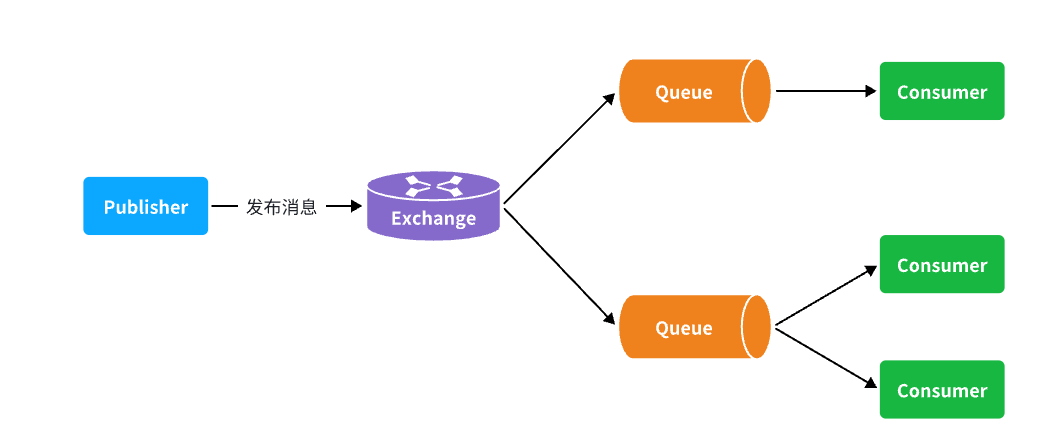
可以看到,在订阅模型中,多了一个 exchange 角色,而且过程略有变化:
- Publisher:生产者,不再发送消息到队列中,而是发给交换机
- Exchange:交换机,一方面,接收生产者发送的消息。另一方面,知道如何处理消息,例如递交给某个特别队列、递交给所有队列、或是将消息丢弃。到底如何操作,取决于Exchange的类型。
- Queue:消息队列也与以前一样,接收消息、缓存消息。不过队列一定要与交换机绑定。
- Consumer:消费者,与以前一样,订阅队列,没有变化
Exchange(交换机)只负责转发消息,不具备存储消息的能力 **,因此如果没有任何队列与 Exchange 绑定,或者没有符合路由规则的队列,那么消息会丢失!
交换机的类型有四种:
- Fanout:广播,将消息交给所有绑定到交换机的队列。我们最早在控制台使用的正是Fanout交换机
- Direct:订阅,基于RoutingKey(路由key)发送给订阅了消息的队列
- Topic:通配符订阅,与Direct类似,只不过RoutingKey可以使用通配符
- Headers:头匹配,基于MQ的消息头匹配,用的较少。
Fanout广播交换机
交换机的作用
- 接收publisher发送的消息
- 将消息按照规则路由到与之绑定的队列
- 不能缓存消息,路由失败,消息丢失
FanoutExchange的会将消息路由到每个绑定的队列(即广播)
在广播模式下,消息发送流程是这样的:
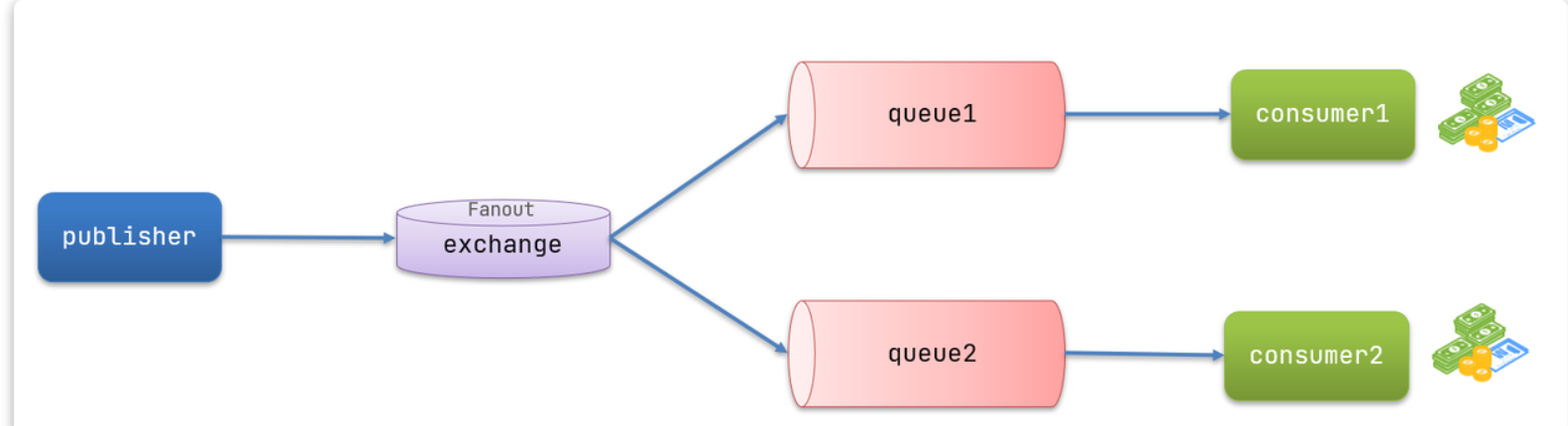
- 可以有多个队列
- 每个队列都要绑定到Exchange(交换机)
- 生产者发送的消息,只能发送到交换机
- 交换机把消息发送给绑定过的所有队列
- 订阅队列的消费者都能拿到消息
流程:
-
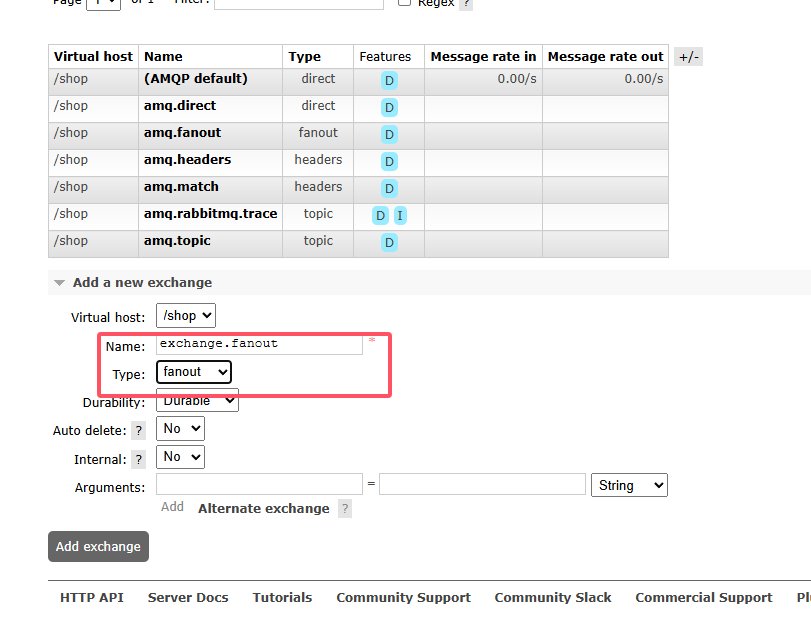
创建一个名为
exchange.fanout的交换机,类型是Fanout -
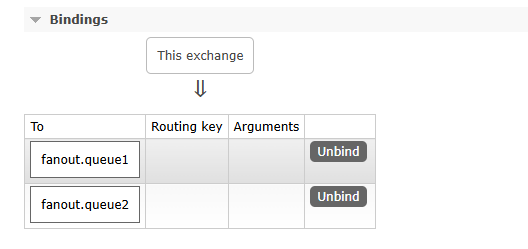
创建两个队列
fanout.queue1和fanout.queue2,绑定到交换机exchange.fanout
- 声明队列和交换机
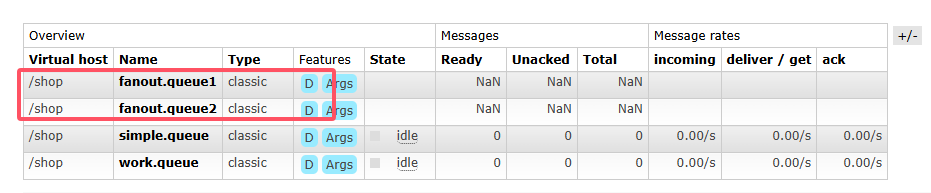
在控制台创建队列fanout.queue1,fanout.queue2:
然后再创建一个交换机:
然后绑定两个队列到交换机:
- 消息发送
在publisher服务的SpringAmqpTest类中添加测试方法:@Test public void testFanoutExchange() { // 交换机名称 String exchangeName = "exchange.fanout"; // 消息 String message = "hello, everyone!"; rabbitTemplate.convertAndSend(exchangeName, "", message); } - 消息接收
在consumer服务的SpringRabbitListener中添加两个方法,作为消费者:@RabbitListener(queues = "fanout.queue1") public void listenFanoutQueue1(String msg) { System.out.println("消费者1接收到Fanout消息:【" + msg + "】"); } @RabbitListener(queues = "fanout.queue2") public void listenFanoutQueue2(String msg) { System.out.println("消费者2接收到Fanout消息:【" + msg + "】"); } - 结果
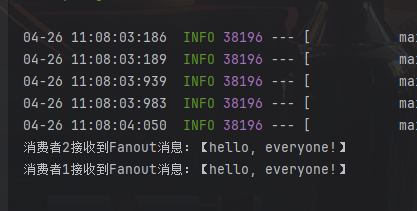
Direct定向交换机
在 Fanout 模式中,一条消息,会被所有订阅的队列都消费。但是,在某些场景下,我们希望不同的消息被不同的队列消费。这时就要用到 Direct 类型的 Exchange。
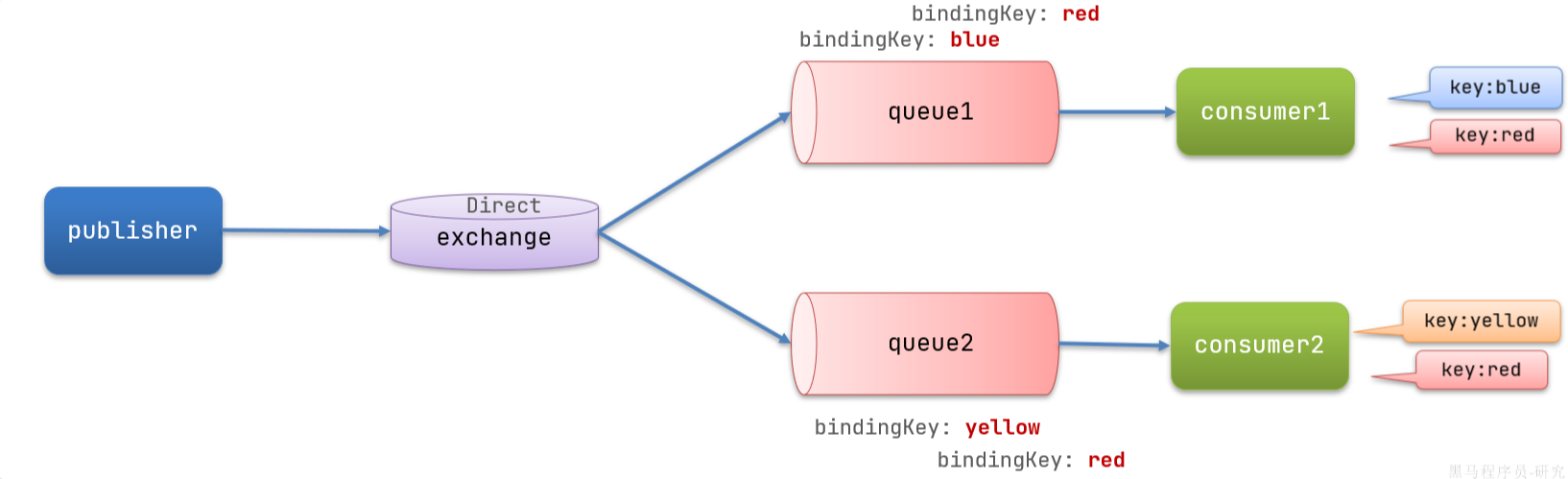
在 Direct 模型下:
- 队列与交换机的绑定,不能是任意绑定了,而是要指定一个
RoutingKey(路由key) - 消息的发送方在 向 Exchange发送消息时,也必须指定消息的
RoutingKey。 - Exchange不再把消息交给每一个绑定的队列,而是根据消息的
Routing Key进行判断,只有队列的Routingkey与消息的Routing key完全一致,才会接收到消息
步骤:
-
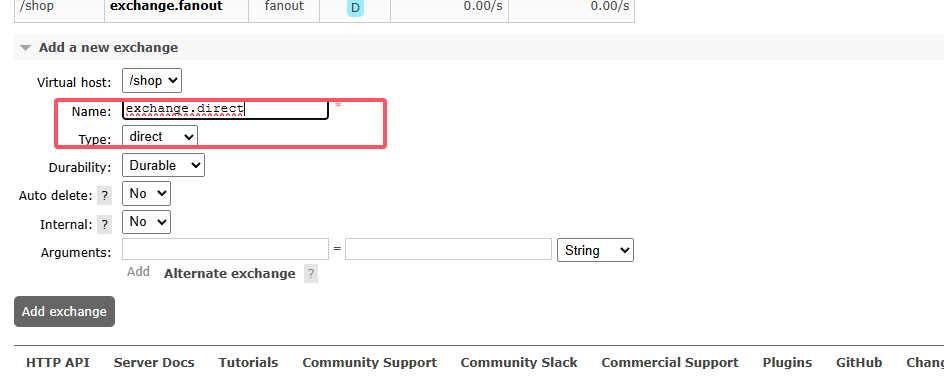
声明一个名为
exchange.direct的交换机
-
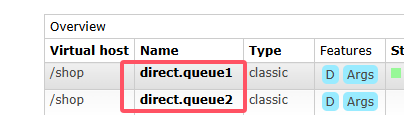
声明队列
direct.queue1和direct.queue2
-
分别给
direct.queue1绑定 red 和 blue,给direct.queue2绑定 red 和 yellow
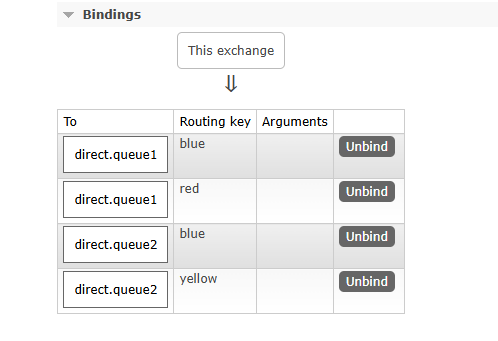
-
在
consumer服务中,编写两个消费者方法,分别监听direct.queue1和direct.queue2
    @RabbitListener(queues = "direct.queue1")
    public void listenDirectQueue1(String msg) {
        System.out.println("消费者1接收到direct.queue1的消息:【" + msg + "】");
    }

    @RabbitListener(queues = "direct.queue2")
    public void listenDirectQueue2(String msg) {
        System.out.println("消费者2接收到direct.queue2的消息:【" + msg + "】");
    }
- 在publisher中编写测试方法,向
exchange.direct发送消息@Test public void testSendDirectExchange() { // 交换机名称 String exchangeName = "exchange.direct"; // 消息 String message = "红色警报!日本乱排核废水,导致海洋生物变异,惊现哥斯拉!"; // 发送消息 rabbitTemplate.convertAndSend(exchangeName, "red", message); }
由于使用的 red 这个 key,所以两个消费者都收到了消息:

我们再切换为 blue 这个 key:
 @Test
 public void testSendDirectExchange() {
     // 交换机名称
     String exchangeName = "exchange.direct";
     // 消息
     String message = "最新报道,哥斯拉是居民自治巨型气球,虚惊一场!";
     // 发送消息
     rabbitTemplate.convertAndSend(exchangeName, "blue", message);
 }
你会发现,只有消费者 1 收到了消息:

Direct 交换机与 Fanout 交换机的差异
- Fanout交换机将消息路由给每一个与之绑定的队列
- Direct交换机根据RoutingKey判断路由给哪个队列
- 如果多个队列具有相同的RoutingKey,则与Fanout功能类似
Topic话题交换机
Topic类型的Exchange与Direct相比,都是可以根据RoutingKey把消息路由到不同的队列,只不过Topic类型Exchange可以让队列在绑定BindingKey 的时候使用通配符!
BindingKey一般都是有一个或多个单词组成,多个单词之间以.分割,例如: item.insert
通配符规则:
#:匹配一个或多个词*:匹配不多不少恰好1个词
举例:
item.#:能够匹配item.spu.insert或者item.spuitem.*:只能匹配item.spu
图示:
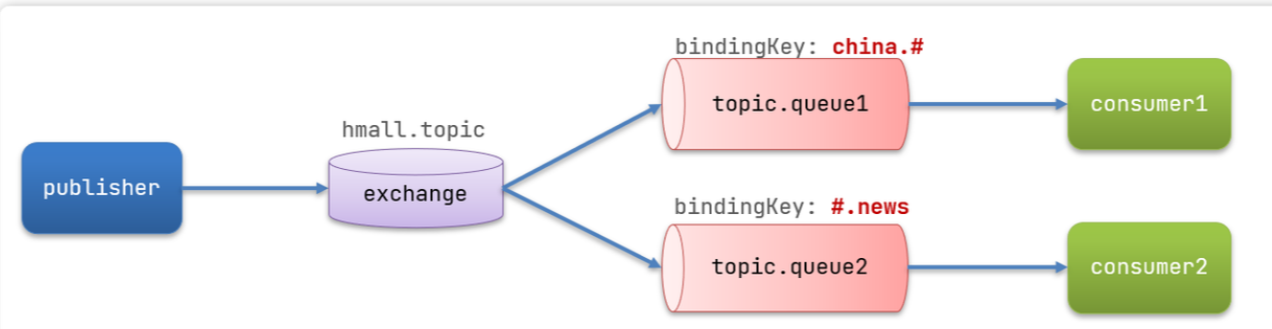
假如此时 publisher 发送的消息使用的RoutingKey共有四种:
china.news代表有中国的新闻消息;china.weather代表中国的天气消息;japan.news则代表日本新闻japan.weather代表日本的天气消息;
解释:
topic.queue1:绑定的是china.#,凡是以china.开头的routing key都会被匹配到,包括:china.newschina.weather
topic.queue2:绑定的是#.news,凡是以.news结尾的routing key都会被匹配。包括:china.newsjapan.news
接下来,我们就按照上图所示,来演示一下 Topic 交换机的用法。
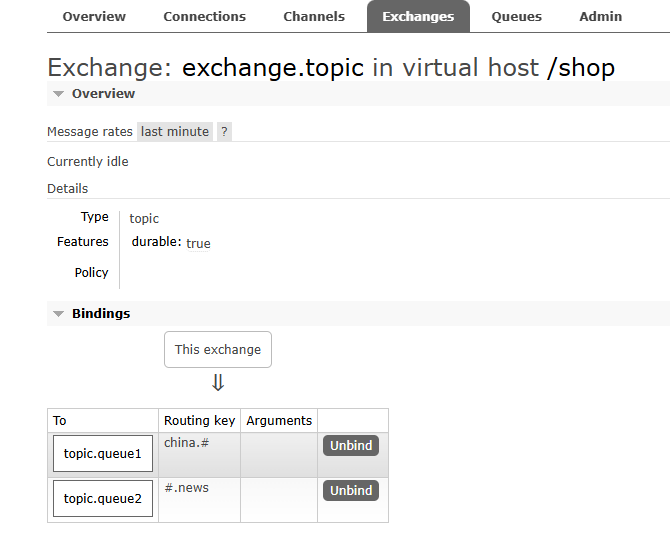
-
在控制台按照图示例子创建队列、交换机,并利用通配符绑定队列和交换机。此处步骤略。最终结果如下
-
消息发送
/** * topicExchange */ @Test public void testSendTopicExchange() { // 交换机名称 String exchangeName = "exchange.topic"; // 消息 String message = "喜报!孙悟空大战哥斯拉,胜!"; // 发送消息 rabbitTemplate.convertAndSend(exchangeName, "china.news", message); } -
消息接收
@RabbitListener(queues = "topic.queue1")
public void listenTopicQueue1(String msg){
    System.out.println("消费者1接收到topic.queue1的消息:【" + msg + "】");
}

@RabbitListener(queues = "topic.queue2")
public void listenTopicQueue2(String msg){
    System.out.println("消费者2接收到topic.queue2的消息:【" + msg + "】");
}
Direct 交换机与 Topic 交换机的差异
- Topic交换机接收的消息RoutingKey必须是多个单词,以
.分割 - Topic交换机与队列绑定时的bindingKey可以指定通配符
#:代表0个或多个词*:代表1个词
声明队列式交换机
在之前我们都是基于RabbitMQ 控制台来创建队列、交换机。但是在实际开发时,队列和交换机是程序员定义的,将来项目上线,又要交给运维去创建。那么程序员就需要把程序中运行的所有队列和交换机都写下来,交给运维。在这个过程中是很容易出现错误的。
因此推荐的做法是由程序启动时检查队列和交换机是否存在,如果不存在自动创建。
基本API
SpringAMQP 提供了一个Queue 类,用来创建队列:
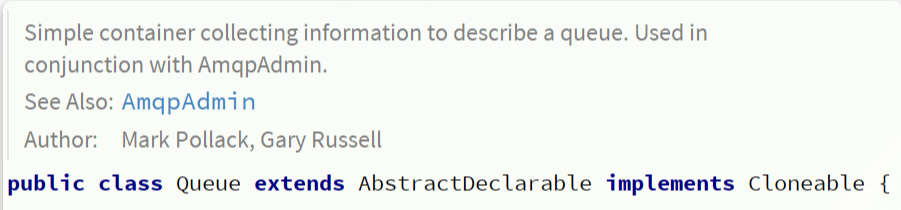
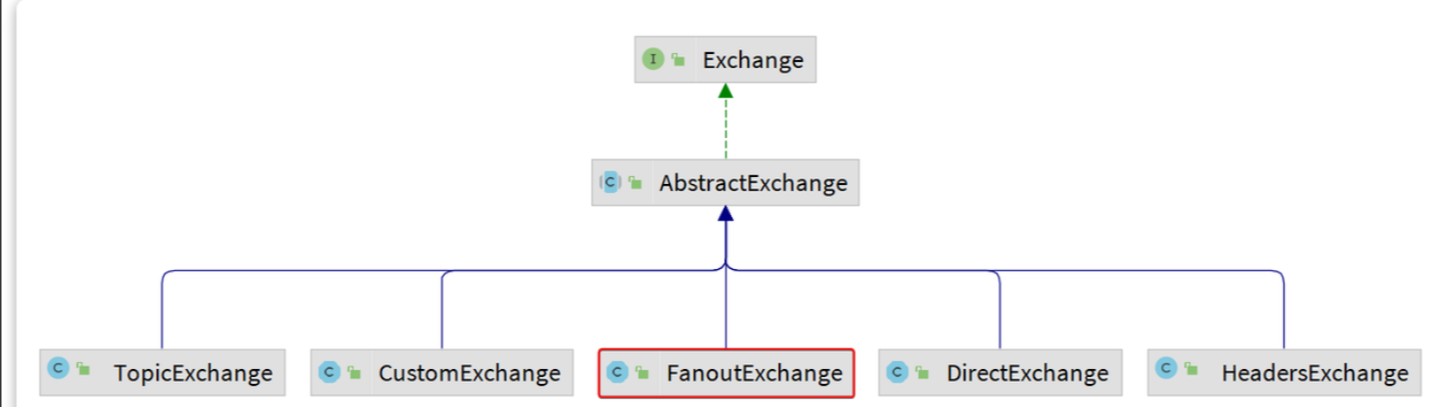
SpringAMQP 还提供了一个 Exchange 接口,来表示所有不同类型的交换机:
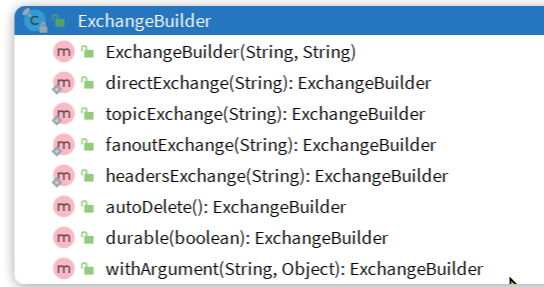
我们可以自己创建队列和交换机,不过 SpringAMQP 还提供了ExchangeBuilder来简化这个过程:
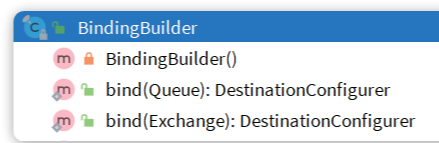
而在绑定队列和交换机时,则需要使用BindingBuilder来创建 Binding 对象:
fanout示例
在 consumer 中创建一个类,声明队列和交换机:
package com.itheima.consumer.config;

import org.springframework.amqp.core.Binding;
import org.springframework.amqp.core.BindingBuilder;
import org.springframework.amqp.core.FanoutExchange;
import org.springframework.amqp.core.Queue;
import org.springframework.context.annotation.Bean;
import org.springframework.context.annotation.Configuration;

@Configuration
public class FanoutConfig {
    /**
     * 声明交换机
     * @return Fanout类型交换机
     */
    @Bean
    public FanoutExchange fanoutExchange(){
        return new FanoutExchange("hmall.fanout");
    }

    /**
     * 第1个队列
     */
    @Bean
    public Queue fanoutQueue1(){
        return new Queue("fanout.queue1");
    }

    /**
     * 绑定队列和交换机
     */
    @Bean
    public Binding bindingQueue1(Queue fanoutQueue1, FanoutExchange fanoutExchange){
        return BindingBuilder.bind(fanoutQueue1).to(fanoutExchange);
    }

    /**
     * 第2个队列
     */
    @Bean
    public Queue fanoutQueue2(){
        return new Queue("fanout.queue2");
    }

    /**
     * 绑定队列和交换机
     */
    @Bean
    public Binding bindingQueue2(Queue fanoutQueue2, FanoutExchange fanoutExchange){
        return BindingBuilder.bind(fanoutQueue2).to(fanoutExchange);
    }
}
direct示例
direct 模式由于要绑定多个 KEY,会非常麻烦,每一个 Key 都要编写一个 binding:
package com.itheima.consumer.config;

import org.springframework.amqp.core.*;
import org.springframework.context.annotation.Bean;
import org.springframework.context.annotation.Configuration;

@Configuration
public class DirectConfig {

    /**
     * 声明交换机
     * @return Direct类型交换机
     */
    @Bean
    public DirectExchange directExchange(){
        return ExchangeBuilder.directExchange("hmall.direct").build();
    }

    /**
     * 第1个队列
     */
    @Bean
    public Queue directQueue1(){
        return new Queue("direct.queue1");
    }

    /**
     * 绑定队列和交换机
     */
    @Bean
    public Binding bindingQueue1WithRed(Queue directQueue1, DirectExchange directExchange){
        return BindingBuilder.bind(directQueue1).to(directExchange).with("red");
    }
    /**
     * 绑定队列和交换机
     */
    @Bean
    public Binding bindingQueue1WithBlue(Queue directQueue1, DirectExchange directExchange){
        return BindingBuilder.bind(directQueue1).to(directExchange).with("blue");
    }

    /**
     * 第2个队列
     */
    @Bean
    public Queue directQueue2(){
        return new Queue("direct.queue2");
    }

    /**
     * 绑定队列和交换机
     */
    @Bean
    public Binding bindingQueue2WithRed(Queue directQueue2, DirectExchange directExchange){
        return BindingBuilder.bind(directQueue2).to(directExchange).with("red");
    }
    /**
     * 绑定队列和交换机
     */
    @Bean
    public Binding bindingQueue2WithYellow(Queue directQueue2, DirectExchange directExchange){
        return BindingBuilder.bind(directQueue2).to(directExchange).with("yellow");
    }
}
基于注解声明
基于 @Bean 的方式声明队列和交换机比较麻烦,Spring 还提供了基于注解方式来声明
-
例如,我们同样声明Direct模式的交换机和队列:
@RabbitListener( bindings = @QueueBinding(value = @Queue(name = "direct.queue1"), exchange = @Exchange(name = "hmall.direct", type = ExchangeTypes.DIRECT), key = {"red", "blue"} )) public void listenDirectQueue1(String msg){ System.out.println("消费者1接收到direct.queue1的消息:【" + msg + "】"); } @RabbitListener(bindings = @QueueBinding( value = @Queue(name = "direct.queue2"), exchange = @Exchange(name = "hmall.direct", type = ExchangeTypes.DIRECT), key = {"red", "yellow"} )) public void listenDirectQueue2(String msg){ System.out.println("消费者2接收到direct.queue2的消息:【" + msg + "】"); } -
再试试Topic模式
@RabbitListener(
    bindings = @QueueBinding(value = @Queue(name = "topic.queue1"),
    exchange = @Exchange(name = "hmall.topic", type = ExchangeTypes.TOPIC),
    key = "china.#"
))
public void listenTopicQueue1(String msg){
    System.out.println("消费者1接收到topic.queue1的消息:【" + msg + "】");
}

@RabbitListener(bindings = @QueueBinding(
    value = @Queue(name = "topic.queue2"),
    exchange = @Exchange(name = "hmall.topic", type = ExchangeTypes.TOPIC),
    key = "#.news"
))
public void listenTopicQueue2(String msg){
    System.out.println("消费者2接收到topic.queue2的消息:【" + msg + "】");
}
消息转换器
Spring 的消息发送代码接收的消息体是一个Object:
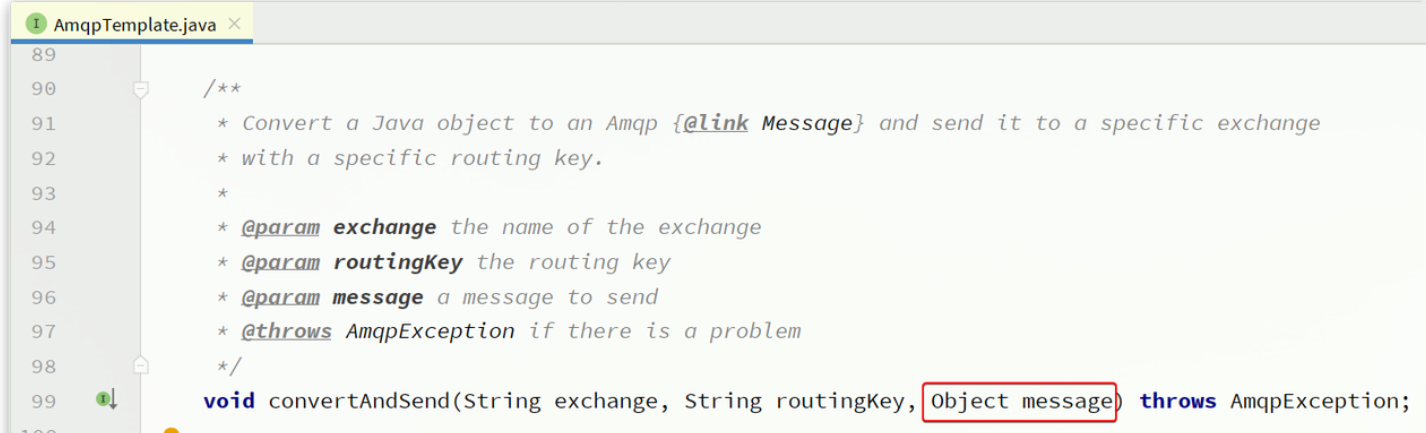
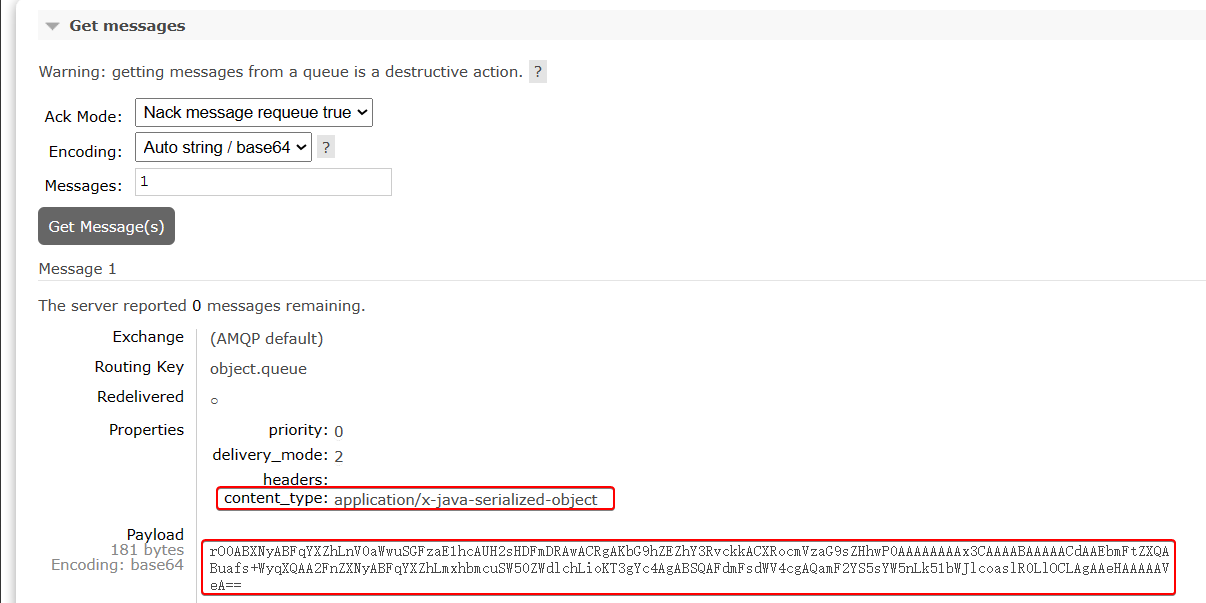
而在数据传输时,它会把你发送的消息序列化为字节发送给 MQ,接收消息的时候,还会把字节反序列化为 Java 对象。
只不过,默认情况下 Spring 采用的序列化方式是JDK 序列化。众所周知,JDK 序列化存在下列问题:
- 数据体积过大
- 有安全漏洞
- 可读性差
测试默认转换器
-
创建测试队列
首先,我们在 consumer 服务中声明一个新的配置类,利用 @Bean 的方式创建一个队列
package com.itheima.consumer.config;

import org.springframework.amqp.core.Queue;
import org.springframework.context.annotation.Bean;
import org.springframework.context.annotation.Configuration;

@Configuration
public class MessageConfig {

    @Bean
    public Queue objectQueue() {
        return new Queue("object.queue");
    }
}
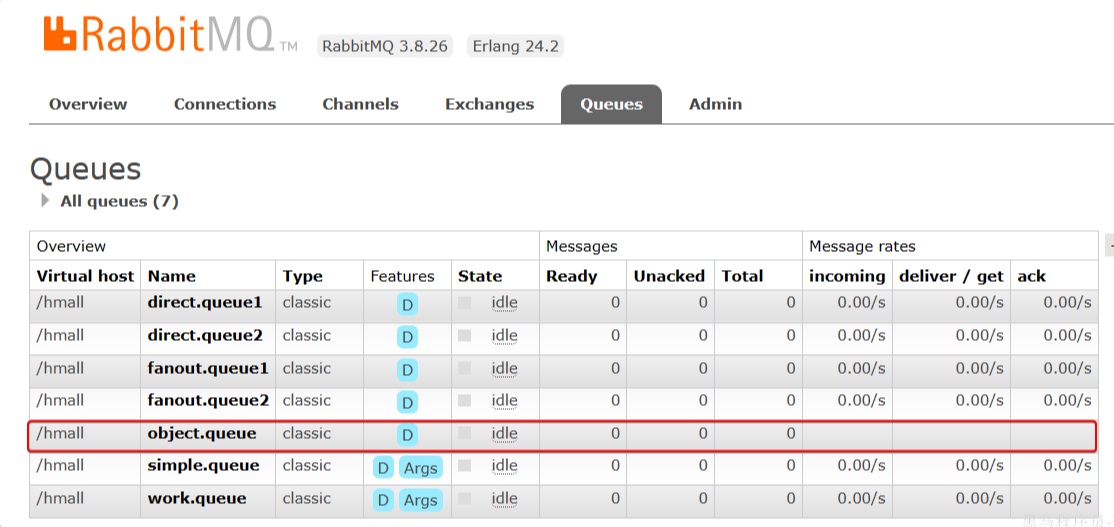
注意,这里我们先不要给这个队列添加消费者,我们要查看消息体的格式,重启 consumer 服务以后,该队列就会被自动创建出来了:
-
发送消息
我们在 publisher 模块的 SpringAmqpTest 中新增一个消息发送的代码,发送一个 Map 对象:
@Test
public void testSendMap() throws InterruptedException {
    // 准备消息
    Map<String,Object> msg = new HashMap<>();
    msg.put("name", "柳岩");
    msg.put("age", 21);
    // 发送消息
    rabbitTemplate.convertAndSend("object.queue", msg);
}
发送消息后查看控制台
配置JSON转换器
显然,JDK 序列化方式并不合适。我们希望消息体的体积更小、可读性更高,因此可以使用 JSON 方式来做序列化和反序列化。
在publisher和consumer两个服务中都引入依赖:
<dependency>
    <groupId>com.fasterxml.jackson.dataformat</groupId>
    <artifactId>jackson-dataformat-xml</artifactId>
    <version>2.9.10</version>
</dependency>
注意,如果项目中引入了
spring-boot-starter-web依赖,则无需再次引入Jackson依赖。
配置消息转换器,在publisher和consumer两个服务的启动类中添加一个 Bean 即可:
@Bean
public MessageConverter messageConverter(){
    // 1.定义消息转换器
    Jackson2JsonMessageConverter jackson2JsonMessageConverter = new Jackson2JsonMessageConverter();
    // 2.配置自动创建消息id,用于识别不同消息,也可以在业务中基于ID判断是否是重复消息
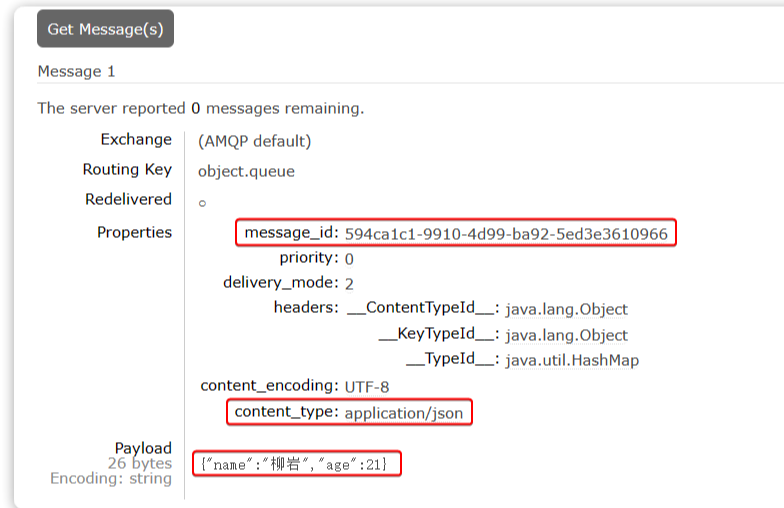
    jackson2JsonMessageConverter.setCreateMessageIds(true);
    return jackson2JsonMessageConverter;
}
消息转换器中添加的messageId可以便于我们将来做幂等性判断。
此时,我们到 MQ 控制台删除object.queue中的旧的消息。然后再次执行刚才的消息发送的代码,到 MQ 的控制台查看消息结构:
消费者接收Object
我们在 consumer 服务中定义一个新的消费者,publisher 是用Map 发送,那么消费者也一定要用 Map 接收,格式如下:
@RabbitListener(queues = "object.queue")
public void listenSimpleQueueMessage(Map<String, Object> msg) throws InterruptedException {
    System.out.println("消费者接收到object.queue消息:【" + msg + "】");
}
Java操作RabbitMQ
本文采用 CC BY-NC-SA 4.0 许可协议,转载请注明出处。